Why you should avoid JSON in Azure SQL Database
JSON is convenient, but storing it in Azure SQL Database takes a lot of space. In this post, I will show you with a demo how much more space we are talking about.
JSON takes more space
In Why Azure SQL Database got a JSON data type I stated that developers love JSON. Given my background you might wonder why I then recommend avoiding JSON in Azure SQL Database if possible. The reason is very simple: storing it takes a lot of space. So you might say: but space isn’t so important in our day and age. You might be right, but a rude awakening awaits you if you see in my following demo how much more space we’re talking about.
Table without JSON
This table will be our baseline table for the comparison. We’ll use a good old simple user table for the demo. So let’s start by creating the table.
CREATE TABLE dbo.UsersRelational
(
    Id        INT           NOT NULL CONSTRAINT PK_UsersRelational PRIMARY KEY CLUSTERED,
    FirstName NVARCHAR(50)  NOT NULL,
    LastName  NVARCHAR(50)  NOT NULL,
    Email     NVARCHAR(100) NOT NULL,
    City      NVARCHAR(50)  NOT NULL,
    Country   NVARCHAR(50)  NOT NULL,
    BirthDate DATE          NOT NULL,
    IsActive  BIT           NOT NULL,
    CreatedAt DATETIME2(0)  NOT NULL
);
As you can see, the table schema doesn’t need JSON. We can use nvarchar() for the FirstName, LastName, Email, City and Country columns. The birthdate column fits nicely in a date type, the IsActive in a bit type and CreatedAt in a datetime2 type. So you see, all our columns found nice homes for themselves and all data types are predictable for all new inserts. So there’s no need to put this table design in a JSON format, which shines in unpredictable scenarios.
So let’s now seed the table with 6 million rows with the following schema and then have a look with sp_BlitzIndex at how much storage the table uses.
-- seed table
DECLARE @Rows INT = 6000000;

INSERT INTO dbo.UsersRelational
       (Id, FirstName, LastName, Email, City, Country, BirthDate, IsActive, CreatedAt)
SELECT  s.value,
        n.FirstName,
        n.LastName,
        CONCAT(LOWER(n.FirstName), N'.', LOWER(n.LastName), s.value, N'@example.com'),
        l.City,
        l.Country,
        DATEADD(DAY, -(6570 + s.value % 20000), CAST('2026-01-01' AS DATE)),
        CASE WHEN s.value % 7 = 0 THEN 0 ELSE 1 END,
        DATEADD(MINUTE, -(s.value % 1000000), CAST('2026-10-01' AS DATETIME2(0)))
FROM GENERATE_SERIES(1, @Rows) AS s
CROSS APPLY (SELECT
        CHOOSE(s.value % 10 + 1,
               N'Anna', N'Ben', N'Clara', N'David', N'Emma',
               N'Felix', N'Grace', N'Hannah', N'Jonas', N'Lea') AS FirstName,
        CHOOSE((s.value / 10) % 10 + 1,
               N'Müller', N'Schmidt', N'Schneider', N'Fischer', N'Weber',
               N'Santos', N'Reyes', N'Cruz', N'Bautista', N'Garcia') AS LastName
) AS n
CROSS APPLY (SELECT
        CHOOSE(s.value % 8 + 1,
               N'Berlin', N'Hamburg', N'Munich', N'Cologne',
               N'Manila', N'Baguio', N'Vienna', N'Zurich') AS City,
        CHOOSE(s.value % 8 + 1,
               N'Germany', N'Germany', N'Germany', N'Germany',
               N'Philippines', N'Philippines', N'Austria', N'Switzerland') AS Country
) AS l;

-- run sp_BlitzIndex
EXEC sp_BlitzIndex @TableName = N'UsersRelational';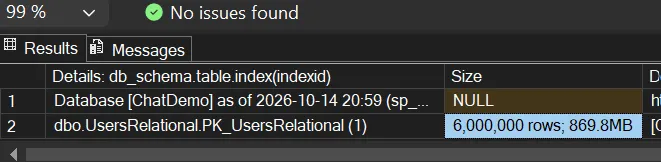
So 6 million rows take up 869.8 MB of storage. That will now be our baseline for the comparison.
Table with JSON
So let’s see how much more space we’ll need with the new native JSON data type for the same table. I just want to emphasize: the table really doesn’t need JSON.
CREATE TABLE dbo.UsersJson
(
    Id      INT  NOT NULL CONSTRAINT PK_UsersJson PRIMARY KEY CLUSTERED,
    Profile JSON NOT NULL
);
That’s our new table. The previous columns will now collapse into a single Profile column using JSON. This gives a lot of flexibility in what we could store in Profile, but our requirements are really just to always store the old columns from the previous table. So the benefits of schema flexibility don’t apply here. So let’s see how much the storage will grow after seeding the table.
-- seed table
INSERT INTO dbo.UsersJson (Id, Profile)
SELECT  Id,
        JSON_OBJECT(
            'firstName': FirstName,
            'lastName' : LastName,
            'email'    : Email,
            'city'     : City,
            'country'  : Country,
            'birthDate': CONVERT(VARCHAR(10), BirthDate, 23),
            'isActive' : IsActive,
            'createdAt': CONVERT(VARCHAR(19), CreatedAt, 126))
FROM dbo.UsersRelational;

-- run sp_BlitzIndex
EXEC sp_BlitzIndex @TableName = N'UsersJson';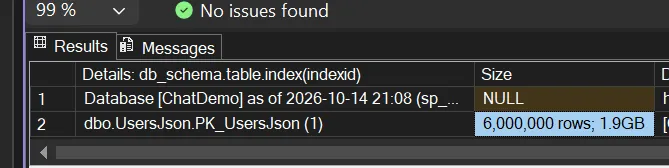
That’s a big jump from 869.8 MB to 1.9 GB. We would have easily doubled our storage for no real benefit in our scenario. Ok, but I get it: maybe someone still hopes that storing JSON with nvarchar(max) would take less space. So let’s find it out next.
Table with JSON (nvarchar(max))
One more time let’s create a new table. It will be the same table as before, just swapping the JSON type for nvarchar(max).
CREATE TABLE dbo.UsersNvarchar
(
    Id      INT           NOT NULL CONSTRAINT PK_UsersNvarchar PRIMARY KEY CLUSTERED,
    Profile NVARCHAR(MAX) NOT NULL
);
So next let’s seed the table and run sp_BlitzIndex a last time.
-- seed table
INSERT INTO dbo.UsersNvarchar (Id, Profile)
SELECT  Id,
        JSON_OBJECT(
            'firstName': FirstName,
            'lastName' : LastName,
            'email'    : Email,
            'city'     : City,
            'country'  : Country,
            'birthDate': CONVERT(VARCHAR(10), BirthDate, 23),
            'isActive' : IsActive,
            'createdAt': CONVERT(VARCHAR(19), CreatedAt, 126))
FROM dbo.UsersRelational;
-- run sp_BlitzIndex
EXEC sp_BlitzIndex @TableName = N'UsersNvarchar';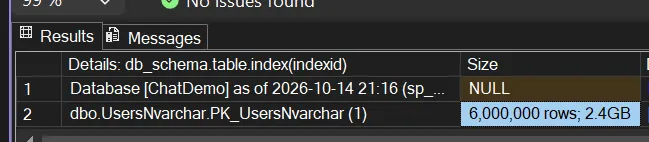
So we did it again: we increased our storage usage even more from 1.9 GB with the JSON data type to 2.4 GB with nvarchar(max). So here we would need around three times more storage than with our first table.
Summary
If you think that you need a JSON column in your table, double check that the flexibility is really a requirement, otherwise try to avoid it. The JSON data type doubles your storage usage, which adds to your cloud bill. If the flexibility a JSON column provides is a non-negotiable requirement, then use the native JSON type and don’t store your JSON in nvarchar(max). Because nvarchar(max) uses even more storage, plus it can’t make use of the new JSON index, which can speed up queries if needed.