Query JSON Data in Azure SQL Database Using JSON_QUERY and JSON_VALUE
Two JSON functions help us read JSON: JSON_QUERY and JSON_VALUE. In this post, I will discuss the differences and how to use them.
The chat history
Last week I showed you the need for JSON in a relational database with the example of a chat history. Today, I’ll show you how to query the Contents column we used to store our messages, tool calls, and tool results.
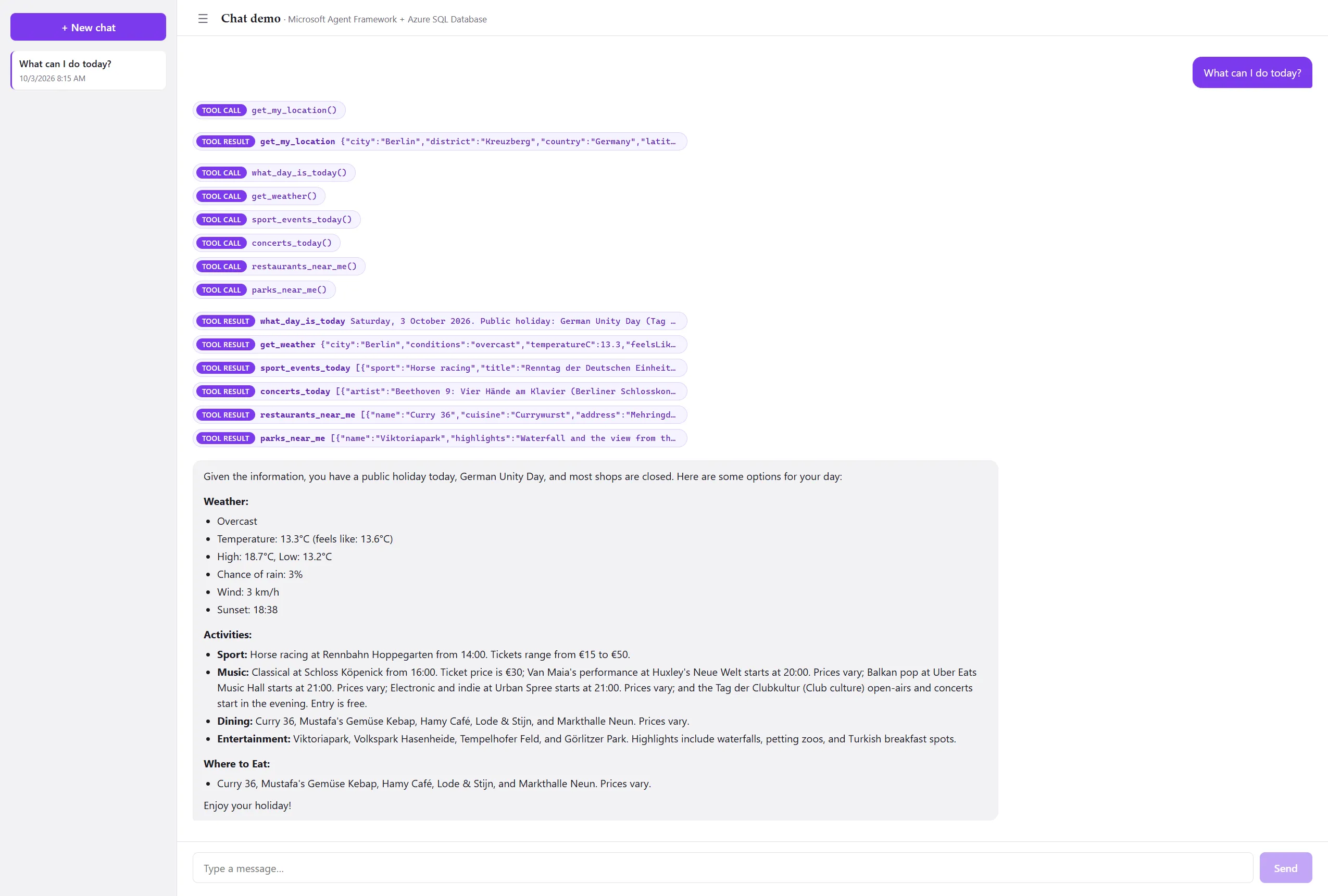
As you can see, I asked the chat agent what I can do today, and it made several tool calls to get my location, the current date, a weather report, and activities around my location. Finally, the agent just responds with some suggestions. Next, I want to show you how to make two queries using JSON_QUERY and JSON_VALUE: one to get just the message texts the user should see and one reporting query to see all tool calls with their results.
First, let me show you how the table is structured again.
SELECT * FROM dbo.Messages
WHERE ConversationId = '94848A8B-CFBE-4E0E-A96C-80B1E4E57567'
Show only the user-facing messages
To show the chat history with only the user-facing chat messages, we have to get all messages that contain a Content of type text and return the text of the JSON object. So let’s first see how it works with JSON_QUERY to understand the two path options (lax and strict) and why, in this scenario, JSON_VALUE is the better choice.
SELECT JSON_QUERY(Contents, '$[*].text') AS MessageText -- same as JSON_QUERY(Contents, 'lax $[*].text')
FROM dbo.Messages
WHERE ConversationId = '94848A8B-CFBE-4E0E-A96C-80B1E4E57567'

BEGIN TRY
	SELECT JSON_QUERY(Contents, 'strict $[*].text') AS MessageText
	FROM dbo.Messages
	WHERE ConversationId = '94848A8B-CFBE-4E0E-A96C-80B1E4E57567'
END TRY
BEGIN CATCH
	SELECT ERROR_MESSAGE() AS ErrorMessage
END CATCH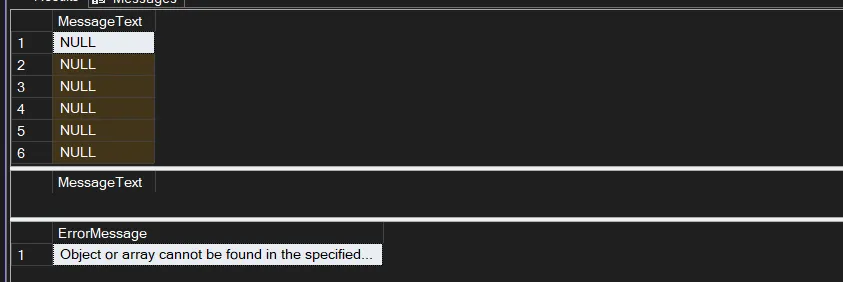
As you can see, the first query returned NULLs in lax mode, which is the default setting for JSON_QUERY. In strict mode, it expects a value. It will throw an error, as you can see. JSON_QUERY returns only objects and arrays, but in our case the text is a scalar value. Therefore, it returned NULL. To get our query working, we have two options.
- wrap the path as an array using
WITH ARRAY WRAPPERso that it can even return a “scalar value” - use
JSON_VALUEbecause it returns a scalar value natively, and can’t return objects or arrays
SELECT JSON_QUERY(Contents, '$[*].text' WITH ARRAY WRAPPER) AS MessageText
FROM dbo.Messages
WHERE ConversationId = '94848A8B-CFBE-4E0E-A96C-80B1E4E57567'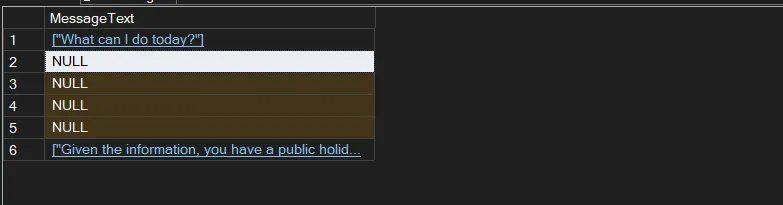
As you can see now, with the Array Wrapper option, we get back the messages we want to display to the user. But it would be even nicer if we didn’t return messages that don’t contain text for the user, so we should filter where Contents contains a content type of text. For that filter, we should use JSON_VALUE because the type is a scalar value.
SELECT JSON_QUERY(Contents, '$[*].text' WITH ARRAY WRAPPER) AS MessageText
FROM dbo.Messages
WHERE ConversationId = '94848A8B-CFBE-4E0E-A96C-80B1E4E57567'
	AND JSON_VALUE(Contents, '$[0]."$type"') = 'text'
That looks great, and to make it even prettier, we should use JSON_VALUE in the SELECT statement too because, in our case, it’s always a single simple string. We never store multiple text contents in one message.
SELECT
       JSON_VALUE(Contents, '$[0].text') AS MessageText,
	   Role
FROM dbo.Messages
WHERE ConversationId = '94848A8B-CFBE-4E0E-A96C-80B1E4E57567'
  AND JSON_VALUE(Contents, '$[0]."$type"') = 'text'
ORDER BY MessageNo;
That looks great and is exactly what the user should get: the minimal, stripped-down version of the chat history needed to display a chat in the frontend.
Report tool calls and their results
Now let’s tackle the second query. This time we already understand that some messages store their tool calls and the results they provided in the Contents column. So a simple reporting query could look like this to get all tool calls and their results using JSON_QUERY.
SELECT c.MessageNo AS CallMessageNo,
       JSON_QUERY(c.Contents, '$[*].name' WITH ARRAY WRAPPER) AS FunctionNames,
       JSON_QUERY(r.Contents, '$[*].result' WITH ARRAY WRAPPER) AS FunctionResults
FROM dbo.Messages AS c
JOIN dbo.Messages AS r
  ON r.ConversationId = c.ConversationId
 AND JSON_VALUE(r.Contents, '$[0].callId') = JSON_VALUE(c.Contents, '$[0].callId')
WHERE c.ConversationId = '94848A8B-CFBE-4E0E-A96C-80B1E4E57567'
  AND JSON_VALUE(c.Contents, '$[0]."$type"') = 'functionCall'
  AND JSON_VALUE(r.Contents, '$[0]."$type"') = 'functionResult'
As you can see, the chat agent first called get_my_location and, after learning where I live, followed up by getting activities near me for today. This query isn’t very sophisticated yet, and for more complex reporting queries, we would make use of the OPENJSON function.
Summary
Use JSON_VALUE if you query for one scalar value and use JSON_QUERY if you query for an array or an object. If you want to get multiple scalar values with JSON_QUERY, you need to use WITH ARRAY WRAPPER.
The default mode for the JSON path is lax, so if nothing is found under the provided path, it returns NULL. If you explicitly set the mode to strict, then it throws an error.
References
JSON_VALUE (Transact-SQL) - Microsoft Learn (1)