Shred JSON Data into Rows in Azure SQL Database Using OPENJSON
JSON_QUERY gives you arrays, but you can't join or count what's inside them. OPENJSON turns each item of a JSON array into its own row. In this post, I will show you how to use it with and without a WITH clause.
Why JSON_QUERY isn’t enough
Last week, I showed you how to query JSON data using JSON_VALUE and JSON_QUERY. We already created an oversimplified reporting query using JSON_QUERY to get the function calls and their results.

As you can see, we got only two rows back, and we didn’t connect the tool calls directly to their results. We have arrays of tool calls and tool results, but no direct connections between them. The only connection is that they happened to be called in message two and message four. To join tool calls to their results into one row, we need to use OPENJSON. This function shreds JSON into its own rows, exactly what we missed last week.
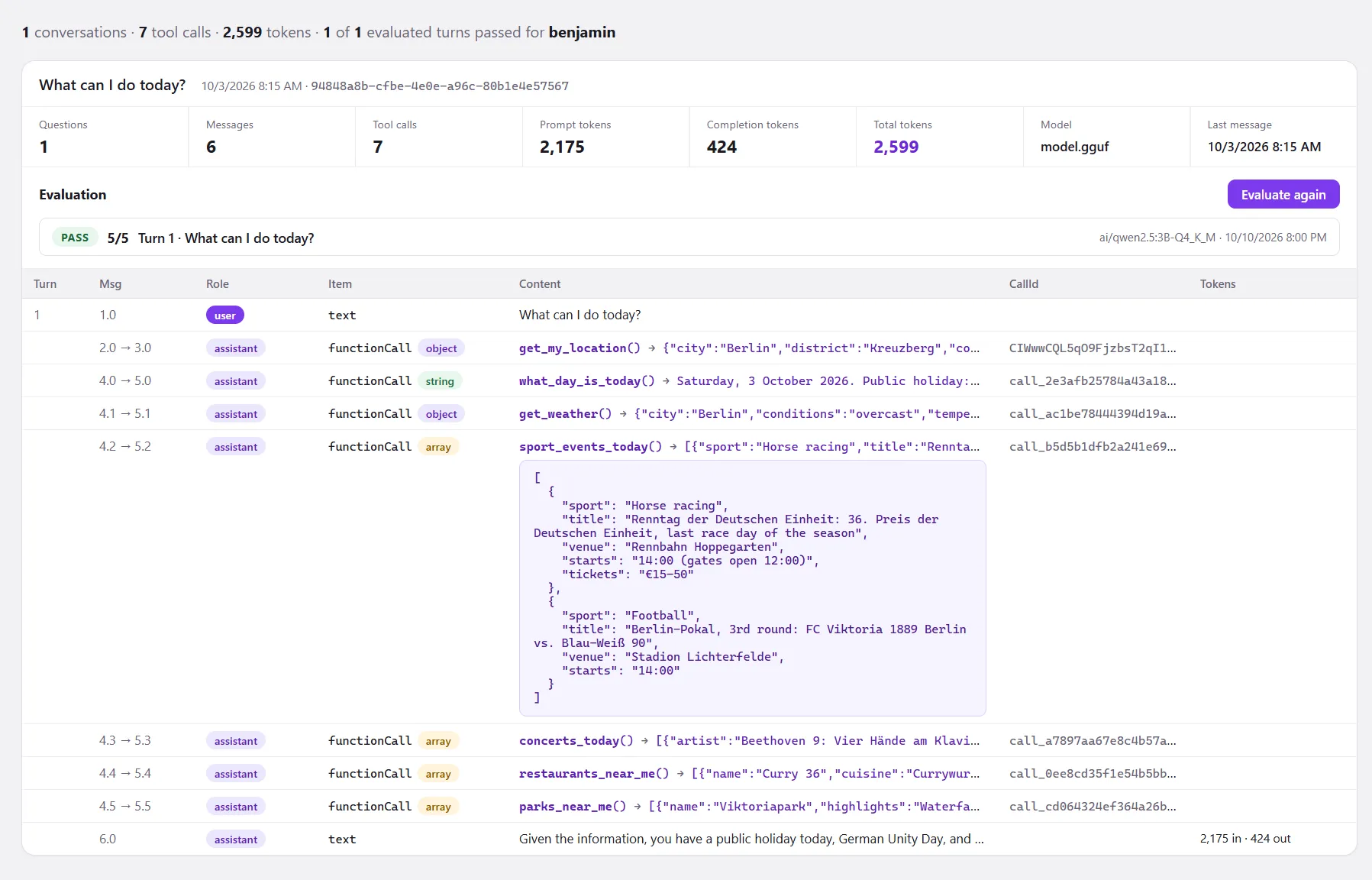
In the admin dashboard, two reporting queries require OPENJSON. The first summarizes the conversation with metadata such as message count, tool call counts, and token consumption. The second query shows all messages in our chat history, including joined tool calls and their results.
Count tool calls per conversation
CREATE OR ALTER PROCEDURE dbo.GetToolCallStats
    @UserId nvarchar(128)
AS
BEGIN
    SET NOCOUNT ON;

    SELECT c.ConversationId,
           c.Title,
           c.CreatedAt,
           COUNT(i.[$type]) AS ToolCalls
    FROM dbo.Conversations AS c
    LEFT JOIN dbo.Messages AS m
           ON m.ConversationId = c.ConversationId
    OUTER APPLY (
        SELECT j.[$type]
        FROM OPENJSON(m.Contents) WITH ([$type] varchar(32) '$."$type"') AS j
        WHERE j.[$type] = 'functionCall'
    ) AS i
    WHERE c.UserId = @UserId
    GROUP BY c.ConversationId, c.Title, c.CreatedAt
    ORDER BY c.CreatedAt DESC;
END;
GO
This counting works because we create rows for content items of a message. To clarify, here’s what the OUTER APPLY produced.
DECLARE @UserId nvarchar(128) = N'benjamin';

SELECT c.ConversationId,
       c.Title,
       m.MessageNo,
       m.Role,
       CAST(j.[key] AS int)                AS ItemIndex,
       JSON_VALUE(j.[value], '$."$type"')  AS ItemType,
       j.[value]                           AS ItemJson
FROM dbo.Conversations AS c
JOIN dbo.Messages AS m
       ON m.ConversationId = c.ConversationId
CROSS APPLY OPENJSON(m.Contents) AS j
WHERE c.UserId = @UserId
    AND JSON_VALUE(j.[value], '$."$type"') = 'functionCall'
ORDER BY c.CreatedAt DESC, m.MessageNo, ItemIndex;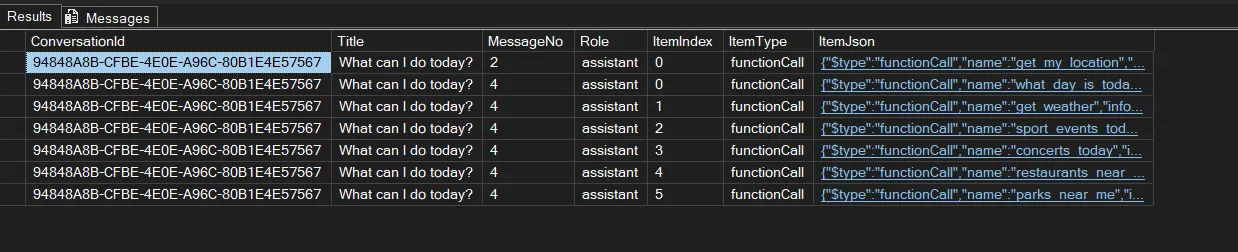
It’s really that simple: if you have a JSON array and need to join items or, in our case, count them, we can create rows for each item in a JSON array and do our operations on them.
Join tool calls to their results
CREATE OR ALTER PROCEDURE dbo.GetConversationItems
    @ConversationId uniqueidentifier
AS
BEGIN
    SET NOCOUNT ON;

    WITH Items AS (
        SELECT m.ConversationId, m.MessageNo, m.Role, m.Model, m.PromptTokens, m.CompletionTokens, m.CreatedAt,
               CAST(i.[key] AS int) AS ItemNo,
               i.[value]            AS Item,
               x.[$type]            AS ItemType,
               x.[text], x.name, x.callId, x.arguments
        FROM dbo.Messages AS m
        CROSS APPLY OPENJSON(m.Contents) AS i
        CROSS APPLY OPENJSON(i.[value]) WITH (
            [$type]   varchar(32)   '$."$type"',
            [text]    nvarchar(max) '$.text',
            name      nvarchar(100) '$.name',
            callId    nvarchar(100) '$.callId',
            arguments nvarchar(max) '$.arguments' AS JSON
        ) AS x
        WHERE m.ConversationId = @ConversationId
    )
    SELECT it.ConversationId,
           SUM(CASE WHEN it.Role = 'user' AND it.ItemNo = 0 THEN 1 ELSE 0 END)
               OVER (ORDER BY it.MessageNo, it.ItemNo ROWS UNBOUNDED PRECEDING) AS Turn,
           it.MessageNo,
           it.ItemNo,
           it.Role,
           it.ItemType,
           it.[text]                         AS [Text],
           it.name                           AS FunctionName,
           it.callId                         AS CallId,
           it.arguments                      AS Arguments,
           r.MessageNo                       AS ResultMessageNo,
           r.ItemNo                          AS ResultItemNo,
           res.[value]                       AS Result,
           res.[type]                        AS ResultType,
           it.Model,
           it.PromptTokens,
           it.CompletionTokens,
           it.CreatedAt
    FROM Items AS it
    LEFT JOIN Items AS r
           ON it.ItemType = 'functionCall'
          AND r.ItemType  = 'functionResult'
          AND r.callId    = it.callId
    OUTER APPLY (SELECT [value], [type] FROM OPENJSON(r.Item) WHERE [key] = 'result') AS res
    WHERE it.ItemType <> 'functionResult'
    ORDER BY it.MessageNo, it.ItemNo;
END;
GO
As you can see, we called OPENJSON twice to get the ItemNo and ResultItemNo columns. That’s the standard pattern, because OPENJSON with a WITH clause doesn’t return the key. So we first called OPENJSON without a WITH clause. Then you get the default key, value, and type back.
DECLARE @Contents nvarchar(max) = N'[
  {"$type":"text","text":"What can I do today?"},
  {"$type":"functionCall","callId":"call_1","name":"get_weather","arguments":{"city":"Berlin"}}
]';

SELECT i.[key], i.[value], i.[type]
FROM OPENJSON(@Contents) AS i;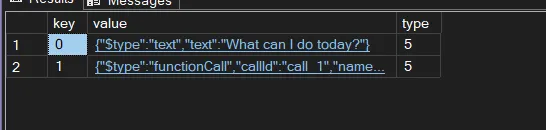
Type 5 means the value is an object, and the key is the index of the original JSON item in the array. This was needed to display message numbers 4.1, 4.2, and so on for each tool call of message 4.
   CROSS APPLY OPENJSON(i.[value]) WITH (
       [$type]   varchar(32)   '$."$type"',
       [text]    nvarchar(max) '$.text',
       name      nvarchar(100) '$.name',
       callId    nvarchar(100) '$.callId',
       arguments nvarchar(max) '$.arguments' AS JSON
   ) AS x
Afterward, we just turned the JSON with the WITH clause into a row schema we can use for our reporting query. First, you define the column name, then the data type, and lastly the path to the value in the provided JSON input. OPENJSON then does the hard work and returns rows, which we used in our reporting query to join each tool call to its adjacent result easily.
Summary
If you have reporting queries and need to work with the JSON data type, you often use OPENJSON to create rows so you can join them or, as in our example, count them, and so on. The WITH clause lets you define the row schema. Without it, you get key, value, and type as default columns.